warning
Work in progress, will document here my tips and tricks for Microsoft flight simulator 2024 and xPlane 12. Computer simulation is cheap or can be expensive, but it is a tool. If you are ready to do your PPL or PPL(H), money should not be an issue.
tips
You dont need anything to enjoy Microsoft Flight Simulator 2024, you can play on a XBOX. These tips apply if you want to seriously make it close to the reality and want to use it as a tool, you need a personal computer, running Windows 11.
“Simulon Prime” flight simulator
Hardware
- 1650.- (used, price new 2400.-) Realsimgear G1000 Suite with original Stand - Optional
- 625.- (used, price new 1100.-) Honeycomb Yoke and flight throttle management, Thrustmaster TPR rudder
- 589.- Next Level Racing® Flight Seat Pro - Optional
- 649.- Next Level Racing® Flight Stand Pro - Optional
- 1942.- Puma-X A-Style - 5th generation USB Joystick - ONLY for PPL(H) - best joystick for helicopter training - Optional
- 1300.- (used, price new 3400.-) Next Level Racing Motion V3 Plattform seat-mover - Optional
- 180.- Next Level Racing Free Standing Single Monitor- Optional
Computer
- 3000.- Computer 7900XTX, 9800X3d, 4TB 990 Pro, 64GB RAM
Software
- 53.- X-Plane 12 (New Year end sales)
- 52.- Microsoft Flight Simulator Aviator Edition 2024 - Microsoft discount
- 60.- Air manager v4 Desktop - Optional
- 22.- Air manager v4 iPad - Optional
- 14.50.- Guimbal Cabri G2 helicopter model - Optional
- 38.- Windows 11 PRO
Yoke
| Yoke | Product | Price |
|---|---|---|
| Turtle beach VélocityOne Flight Control System | 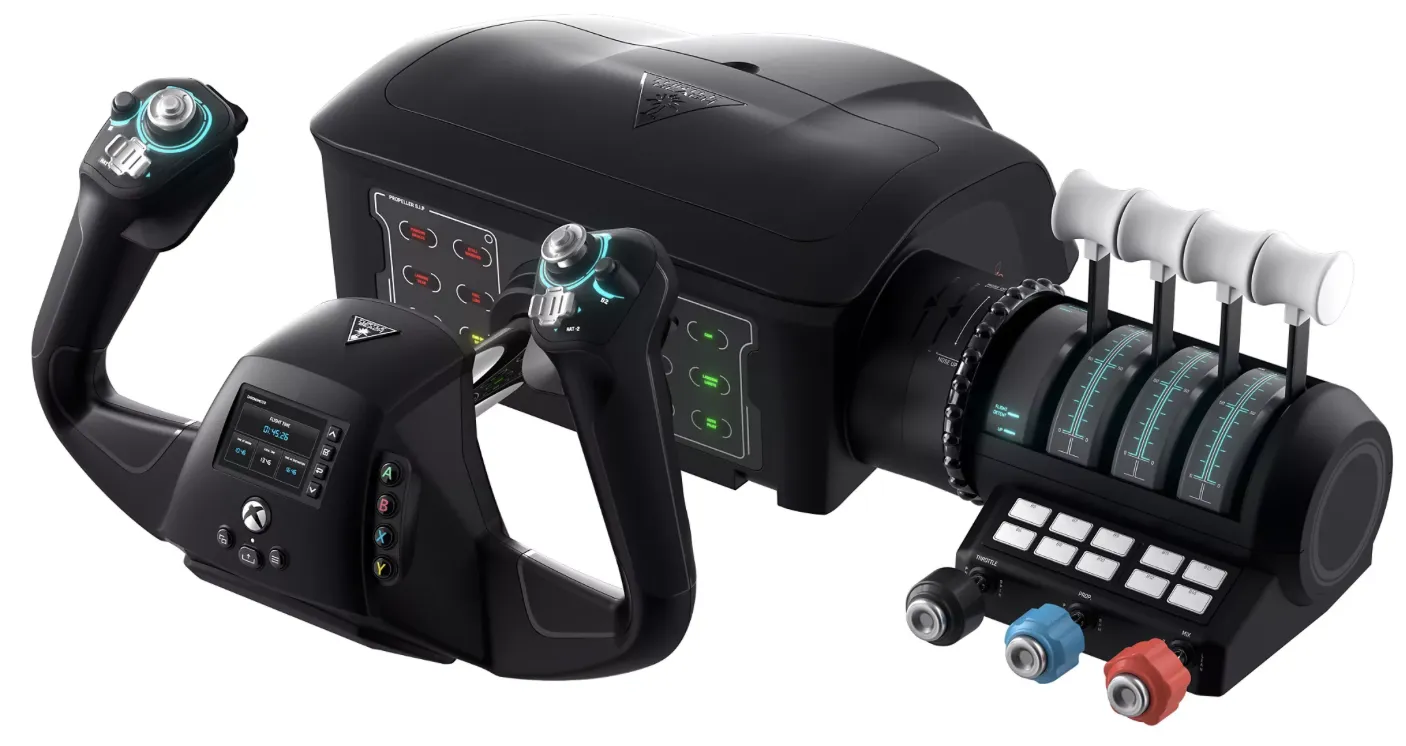 | 360.- CHF |
| Logitech G Saitek Pro Flight Yoke System | xxx | $115 |
| Honeycomb Alpha | 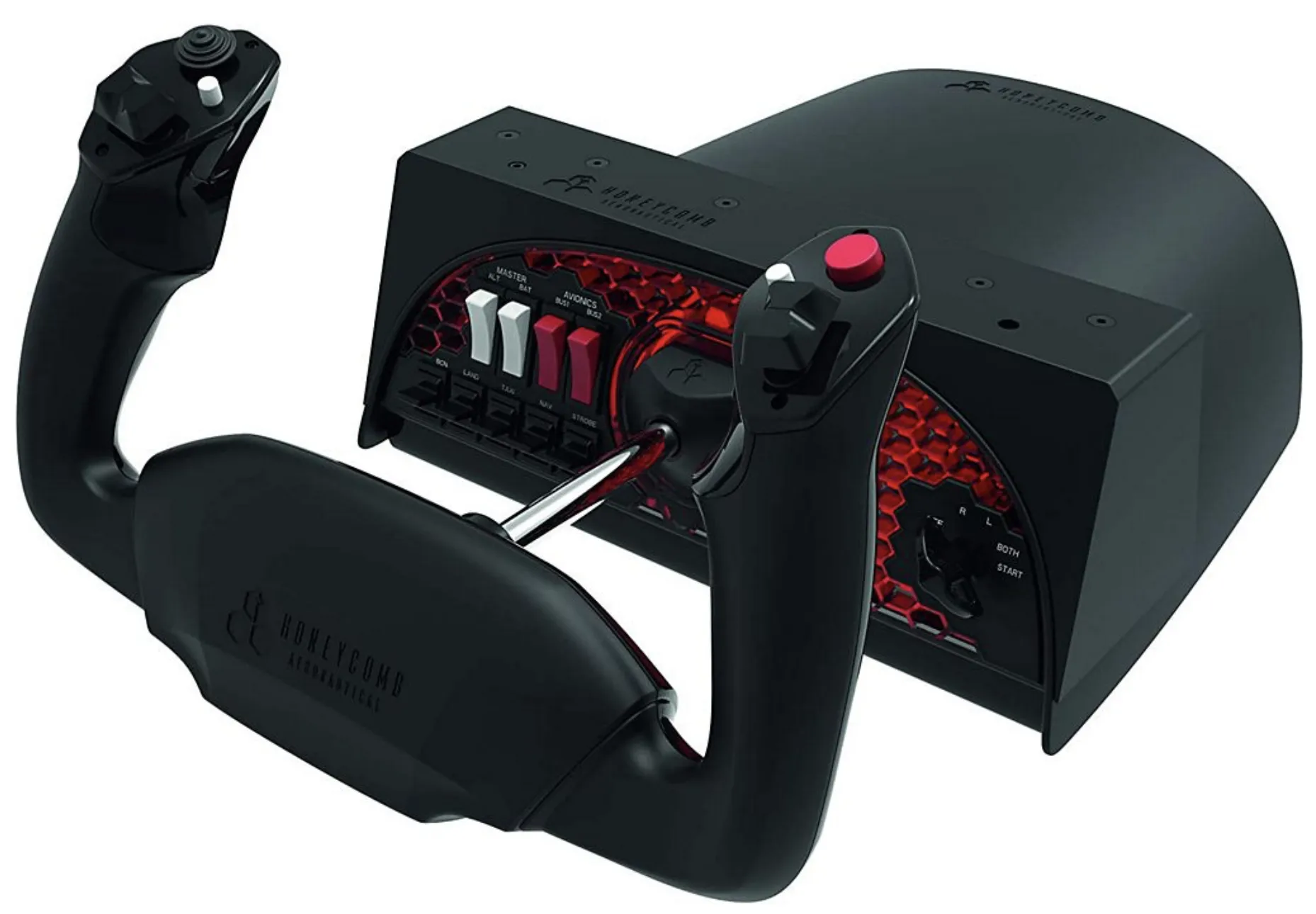 It was designed to meet the requirements of flight simulator users, but also of flight students and pilots. All internal components are manufactured in aviation quality and offer a realistic flight experience with realistic ergonomics. The high quality mechanics offer a realistic full 180° rotation angle for aileron control with a self-centering mechanism without dead zone. In longitudinal direction the steel shaft allows a range of motion of 15 cm. The mechanism is made entirely of metal for durability and the yoke features a switch panel with battery and alternator switch, avionics main switch and light switches. It is equipped with a red LED backlight so that it can be easily operated at night. There is also an ignition switch, as is common on piston engine aircraft. The left handle has two buttons, two 2-way hat switches and a push-to-talk button, while the right handle has two more 2-way hat switches, an 8-way panorama switch and a button. Thanks to a matching bracket, Alpha Flight Controls are compatible with both Honeycomb and Saitek products. The included driver and configuration software provides individual profile settings for different aircraft and is compatible with Windows and macOS. iPad/Android device mount for the honeycomb It was designed to meet the requirements of flight simulator users, but also of flight students and pilots. All internal components are manufactured in aviation quality and offer a realistic flight experience with realistic ergonomics. The high quality mechanics offer a realistic full 180° rotation angle for aileron control with a self-centering mechanism without dead zone. In longitudinal direction the steel shaft allows a range of motion of 15 cm. The mechanism is made entirely of metal for durability and the yoke features a switch panel with battery and alternator switch, avionics main switch and light switches. It is equipped with a red LED backlight so that it can be easily operated at night. There is also an ignition switch, as is common on piston engine aircraft. The left handle has two buttons, two 2-way hat switches and a push-to-talk button, while the right handle has two more 2-way hat switches, an 8-way panorama switch and a button. Thanks to a matching bracket, Alpha Flight Controls are compatible with both Honeycomb and Saitek products. The included driver and configuration software provides individual profile settings for different aircraft and is compatible with Windows and macOS. iPad/Android device mount for the honeycomb | New arounf 260.- CHF (got it for 160.- used but like new in the box) |
Throttle
| Throttle | Product | Price |
|---|---|---|
| Turtle beach VélocityOne Flight Control System | | 360.- CHF |
| Logitech G Saitek Pro Flight Throttle Quadrant | xxx | $66 |
| Honeycomb Bravo | 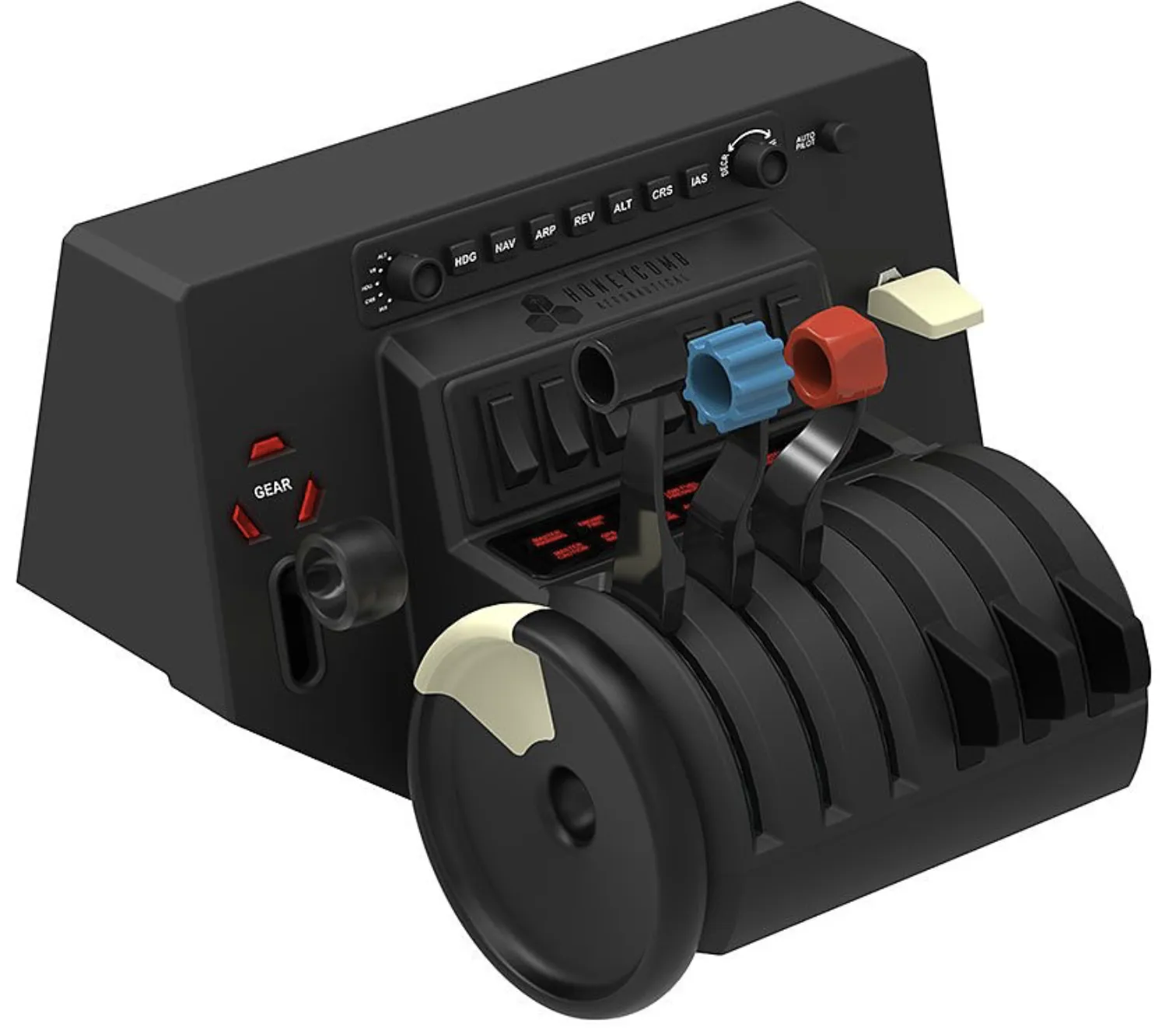 The thrust lever quadrant allows configurations from the single-engine small aircraft to the four-engine airliner. It supports various cockpit systems such as autopilot, annunciator panel, landing gear switch, flaps and trim. The thrust levers can be configured for single and multi-engine small aircraft with separate flap switch. For use in an airliner, a configuration with two or four thrust levers, levers for spoilers and flaps can be selected. Here the thrust reverser can also be operated. The autopilot panel includes the most common functions used in commercial and GA aircraft. The Annunciator Panel with 14 indicator lights displays the most important status and warning messages of the on-board systems. Additional functions are provided by the landing gear switch, the trim wheel and 7 freely programmable switches, so that the user does not have to use the keyboard so often. The thrust lever quadrant allows configurations from the single-engine small aircraft to the four-engine airliner. It supports various cockpit systems such as autopilot, annunciator panel, landing gear switch, flaps and trim. The thrust levers can be configured for single and multi-engine small aircraft with separate flap switch. For use in an airliner, a configuration with two or four thrust levers, levers for spoilers and flaps can be selected. Here the thrust reverser can also be operated. The autopilot panel includes the most common functions used in commercial and GA aircraft. The Annunciator Panel with 14 indicator lights displays the most important status and warning messages of the on-board systems. Additional functions are provided by the landing gear switch, the trim wheel and 7 freely programmable switches, so that the user does not have to use the keyboard so often. | New arounf 265.- CHF (got it for 160.- used but like new in the box) |
Rudder
| Rudder | Product | Price |
|---|---|---|
| VelocityOne™ Rudder | 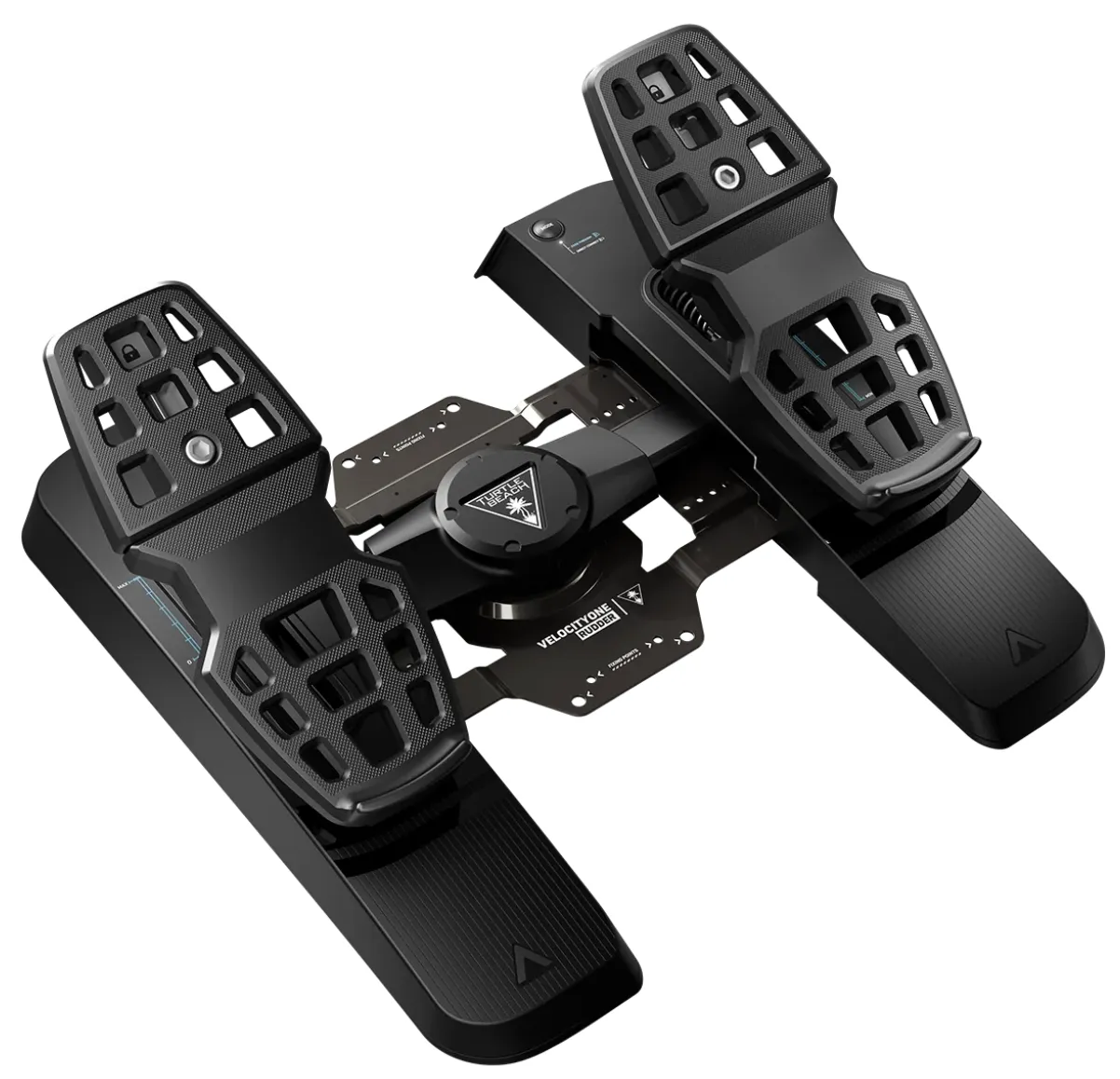 | 360.- CHF |
| Logitech G Saitek Pro Flight Rudder Pedals | xxx | $131 |
| Thrustmaster Rudder TPR | 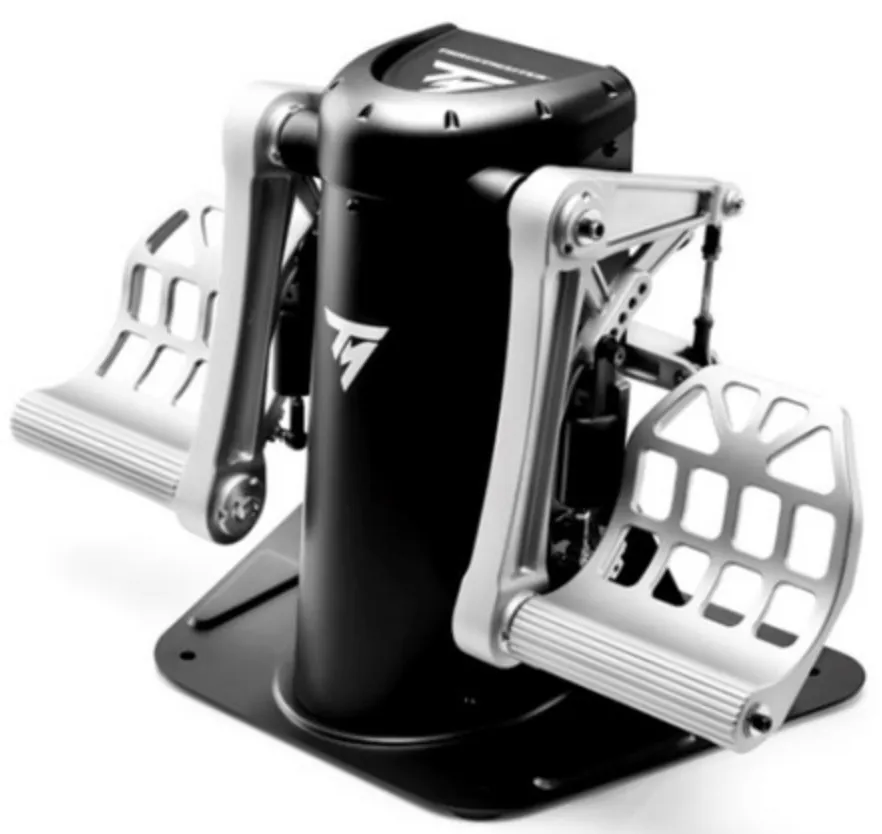 All set for immediate liftoff: With the first rudder with a S.M.A.R.T-guide rail system (Sliding Motion on Aluminium Rail Tracks) for smooth control. System of 4 industrial aluminium slide rails for a perfect sliding movement. Two differential brake pedals: Large differential brake pedals: 25 centimeters (equivalent to shoe size 45). USB and/or proprietary RJ12 connectivity: On PC (Windows 10/8/7/Vista), works with all standard joysticks. On PC and on PS4, works and connects directly to the Thrustmaster T.Flight Hotas 4 joystick. Advanced calibration software for setting dead zones: Set the central dead zone. T.A.R.G.E.T Advanced PC Programming Software: Allows you to program the axes and differential brakes. Two differential brake pedals for optimized flying! - Large differential brake pedals: 25 centimeters (shoe size 12/45). Rounded central pivot point with central grip on the differential brake axles. Pivot point with a 15° range of motion: On an incline for intentional operation, avoiding unintentional activation when using the rudder.Stable and precise - Versatile ergonomic design, suitable for all types of flights (aerial combat, space adventure, civil flight, etc.): Removed heel support = rudder control with the ball of the foot. Mounted heel support = one hundred percent support of the foot on the pedal. All set for immediate liftoff: With the first rudder with a S.M.A.R.T-guide rail system (Sliding Motion on Aluminium Rail Tracks) for smooth control. System of 4 industrial aluminium slide rails for a perfect sliding movement. Two differential brake pedals: Large differential brake pedals: 25 centimeters (equivalent to shoe size 45). USB and/or proprietary RJ12 connectivity: On PC (Windows 10/8/7/Vista), works with all standard joysticks. On PC and on PS4, works and connects directly to the Thrustmaster T.Flight Hotas 4 joystick. Advanced calibration software for setting dead zones: Set the central dead zone. T.A.R.G.E.T Advanced PC Programming Software: Allows you to program the axes and differential brakes. Two differential brake pedals for optimized flying! - Large differential brake pedals: 25 centimeters (shoe size 12/45). Rounded central pivot point with central grip on the differential brake axles. Pivot point with a 15° range of motion: On an incline for intentional operation, avoiding unintentional activation when using the rudder.Stable and precise - Versatile ergonomic design, suitable for all types of flights (aerial combat, space adventure, civil flight, etc.): Removed heel support = rudder control with the ball of the foot. Mounted heel support = one hundred percent support of the foot on the pedal. | New arounf 450.- CHF (got it for 300.- used) |
Stream Deck XL or + (optional)
Allow you to win time by creating shortcuts for preflight, flight. There is a lot of free and paid extension for the Stream Deck at https://flightsim.to/others/stream-deck/1
If youre on a budget you can also use a cheap tablet and Touch Portal (Android/iOS) https://play.google.com/store/apps/details?id=rils.apps.touchportal&hl=en
PilotsDeck
Directly control the FlightSim from your StreamDeck! https://github.com/Fragtality/PilotsDeck
Cessna 172 for xplane 12 PilotDeck https://x-plane.to/file/1654/streamdeck-profile-for-cessna-172-skyhawk-steam-gauges-version
more at https://x-plane.to/search/PilotsDeck
Logitech Flight panels
Saitek has been bought by Logitech, and they have nice panels.
Logitech Flight Switch Panel
You don’t need the Logitech Flight Switch Panel if you already have the Honeycomb Alpha (yoke) and Bravo (throttle quadrant). Here’s why:
- The Honeycomb Alpha already has a master battery, alternator, avionics, and light switches, covering most of what the Logitech panel offers.
- The Honeycomb Bravo includes a landing gear lever with LED indicators, which is one of the key features of the Logitech panel.
- The Logitech panel primarily adds additional switches for lights, fuel pump, de-icing, and magneto selection, but you can easily map those to the Bravo or Alpha. Unless you really want dedicated physical switches for every function.
Logitech Flight Multi Panel
you don’t need the Logitech Flight Multi Panel if you already have the Honeycomb Alpha (yoke) and Bravo (throttle quadrant). The Bravo Throttle Quadrant already includes an autopilot panel with knobs and buttons for altitude, heading, vertical speed, and other essential autopilot functions. This effectively makes the Logitech panel redundant. However, if you want additional LCD readouts for autopilot settings or prefer the Logitech layout, you could still use it, but it’s not necessary.
Logitech Flight Radio Panel
What the Logitech Flight Radio Panel Adds:
- Dedicated radio tuning (COM, NAV, ADF, XPDR)
- Quick frequency changes without needing to use mouse/keyboard.
- More realism if you frequently interact with radios (e.g., VATSIM, IFR flights).
Do You Need It?
- If you mostly fly VFR, the Bravo’s dials and buttons can handle COM/NAV switching just fine.
- If you fly IFR often, having a separate radio stack can improve immersion and efficiency.
- If you use VR a lot, physical radio controls can make tuning easier without relying on VR controllers.
Alternative?
- Use an on-screen radio stack (in-sim pop-ups).
- Map radio controls to Bravo’s knobs and switches (less intuitive but works).
- Consider an iPad with Air Manager for a touchscreen radio stack.
If you like having dedicated, easy-to-use radio controls, then the Logitech panel is a good add-on. Otherwise, the Bravo can handle most of it with some extra mappings.
Two Logitech Flight Radio Panel better than one?
Some people use two Logitech Flight Radio Panels to increase efficiency and realism, especially for IFR flying. Here’s why:
1. Quick Access to Multiple Frequencies
Each Logitech Flight Radio Panel has two frequency displays (active & standby), and you can toggle between:
- COM1 / COM2 (for ATC communications)
- NAV1 / NAV2 (for VOR/ILS navigation)
- ADF (for NDB navigation)
- XPDR (for squawk codes)
With one panel, you have to switch modes frequently. With two, you can dedicate:
- One for COM1 & COM2 (handling ATC comms without switching modes).
- One for NAV1 & NAV2 or ADF & XPDR (for quick navigation adjustments).
2. More Realistic Setup
In real aircraft, radios are usually separate units in the stack. Two panels allow:
- Permanent COM & NAV displays, making tuning easier.
- Faster frequency changes without switching modes mid-flight.
3. IFR & VATSIM Flying
Pilots who fly IFR (especially on VATSIM or IVAO) need to change frequencies constantly. With two panels:
- One panel can handle ATC frequencies (COM1/COM2).
- The other can handle NAV aids & squawk codes.
This makes operations faster, smoother, and more immersive.
4. Convenience in VR
If you’re flying in VR, using two panels means less button switching and more intuitive frequency management, so you don’t have to fiddle with menus or controllers.
Do You Need Two?
- If you fly casual VFR, one panel (or even just the Bravo) is enough.
- If you fly serious IFR, especially online, two panels can greatly improve workflow.
- If you prefer max realism, a dual-panel setup mimics real aircraft radio stacks.
You can find them used everywhere. The Honeycomb yoke provide already (Switch) and (Multi), the radio panel is a “nice to have”.
Drivers
In Microsoft Flight Simulator 2024, you MUST manualy start the Logitech Plugin. It’s noch automatically initialising with the start of MSFS 2024. Install the driver https://download01.logi.com/web/ftp/pub/techsupport/simulation/MSFS_Plugin_x64_Software_8.0.313.0.exe and run the exe before starting flight simulator 2024. So, if you have the plug-in installed, create a shortcut on the desktop with this adress and the start arguments at the end: “C:\Program Files\Logitech\Microsoft Flight Simulator Plugin\LogiMicrosoftFlightSimulator.exe” –run –force
The Logitech driver has not been updated for Microsoft Flight Simulator 2024 yet, and is limited. There is a project Spad.next that let you customize all buttons and switches, work great but require a one time payment.
Head Tracking
Head Tracking using a cheap webcam with OpenTrack
Choose a webcam with qt least 60fps.
- Logitech Brio 500 60fps or
- Logitech C920S Pro HD Webcam 30 fps – A solid 1080p webcam known for consistent performance; widely used in OpenTrack setups. https://github.com/opentrack/opentrack
Head Tracking using an iPhone with AITrack (Face Tracking) + iPhone Camera
You can run AITrack (a separate app that uses your phone camera for head tracking) and feed its data into OpenTrack on your PC. The iPhone acts like a high-quality webcam, streaming face tracking data over Wi-Fi or USB. Pros: Cheap (free software), easy to set up. Cons: Needs good lighting, not as robust as IR tracking. 👉 Setup:
- Install AITrack https://github.com/AIRLegend/aitrack
- Install openTrack https://github.com/opentrack/opentrack
- Install a camera streaming app on iPhone (like iVCam or EpocCam).
- Connect iPhone to PC → Open AITrack → Forward to OpenTrack.
More Screen estate
Simulator enviroment dilemna… You can go cheap or crazy expensive really fast.
| Choice | Note |
|---|---|
| Use Real MFD, PFD | Expensive as hell, not flexible but close to real feeling, with real knob and buttons |
| Touch display With HDMI | LCD screens with touch are not cheap |
| Touch display with Android | cheap and you have a real tablet fto use when not flying! I use Lenovo M11 |
| LCD display using HDMI to desktop | cheap, require a free extension in MSFS |
| LCD display, Linux, PI | cheap, DIY with linux and air player and air manager on your desktop, custom 3d printed case |
Use real MFD
Going with physical and expensive hardware MFD!
tips
Multifunction display (MFD): Small screen (CRT or LCD) in an aircraft that can be used to display information to the pilot in numerous configurable ways. Often an MFD will be used in concert with a PFD (primary flight display).
Some MFD examples:
- https://flightsimdiy.com 500.- and up
- https://www.realsimgear.com up to 2500.-
- Thrustmaster MFD panel
- Logitech MFD panel , try to grab them second hand! (110.- to 170.-)
- DIY from thingiverse, e.g. https://www.thingiverse.com/thing:5738740
- MFD can also be build, a raspberry pi, a 3D printed enclosure and linux air player
Recommended is to use a touch panel or monitor and buy Air manager v4 (https://www.siminnovations.com/shop/air-manager-desktop/ ) to you simulate any panel on a touch screen monitor (USB) or iPad so you can avoid buying costly MFD.
Install Air Manager on iPad (22€ iOS, 23 CHF Android) and connect XPlane or Microsoft Simulator 2024
Glas cockpit
A glass cockpit is a modern aircraft cockpit that replaces traditional analog gauges and dials with electronic displays, typically LCD or LED screens. These displays show flight information such as altitude, airspeed, heading, and navigation data. The Garmin G1000 is one of the most popular glass cockpit systems, widely used in general aviation, training aircraft, and some business jets.
Key Components of a Glass Cockpit with Garmin G1000:
Primary Flight Display (PFD):
The PFD provides essential flight information, including:- Attitude Indicator (pitch and roll)
- Airspeed Indicator
- Altimeter
- Vertical Speed Indicator (VSI)
- Horizontal Situation Indicator (HSI), showing navigation and heading
- Flight Director cues
Multi-Function Display (MFD):
The MFD complements the PFD by displaying additional data:- Moving map with GPS navigation
- Engine parameters
- Weather radar (if equipped)
- Traffic information (with ADS-B or TCAS systems)
- Checklist and system diagnostics
Integrated Avionics Suite:
The G1000 integrates various systems, such as:- GPS navigation
- Autopilot
- Traffic and weather data integration
- Radio communication (VHF)
Advantages of a Glass Cockpit with G1000:
- Improved Situational Awareness: The PFD and MFD provide a clear and intuitive overview of flight data.
- Reduced Workload: Features like a flight director and autopilot simplify complex tasks.
- Customization: Pilots can tailor displays to show relevant information.
- Training Efficiency: Standardized layouts across aircraft make transitioning between planes easier.
Knobster (nice to have)
Allows you to control every wheel and button of your flight simulation software like Air Manager or Air Player Cockpit Panel, also works in VR with knobXP for xplane or knobFS for Microsoft flight simulator
https://siminnovations.com/wiki/index.php?title=KnobFS
The knobster can be build on your own but costs are really close to price asked…
Touch display With HDMI
you may need a lot of HDMI cable and support (commercial MFD use USB port instead).
You need to use Pop Out Panel Manager (Free) or Air Manager V4
Touch display with tablet
Use either
- Air Manager v4
- simionic but may be outdated The most immersive! You can use a free tool to define what will be rendered by the simulator and what not: you keep your physical panels visible!
Motion platform (really nice to have)
tips
Motions platform deliver all six axes of movements: heave, roll, pitch, surge, sway, and yaw. it will never be able to smulate G
- Next Level Racing motion v3 3600.- 25kg what i’m using
- Qubic System QS-S25 https://qubicsystem.com/product/qs-s25/ 30k CHF 460kg!
- DoF Reality P6 Pro https://dofreality.com/product/racing/motion-racing-rig-6-axis-pro-p6/ 8000.- CHF
Buttkicker / Haptic Feedback (for enhanced immersion) - (really nice to have)
Not needed with the motion v3 platform
Do It Yourself
You just need a cheap transducer (e.g. https://www.amazon.it/Rockwood-Bodyshaker/dp/B002LQAHPE) , a cheap amplifier (e.g. https://www.amazon.com/gp/aw/d/B06Y67PZB1) , some cables and maybe a usb sound card. Plug everything together and run the simshaker software or https://github.com/SHWotever/SimHub/wiki/Shake-It-for-bass-shakers (Car)
https://forums.mudspike.com/t/feedback-for-flight-simulation-2020/10886
Buttkicker
You can install the buttkicker https://thebuttkicker.com but it can cost up to 1000.- CHF
Mixed Reality
You need
Quest 3 and RTX 4080 super. I have been experimenting with Virtual Desktop and Airlink. I can run the game at a very high resolution over 3000 pixel per eye. 200 LOD in Terrain details and 140 LOD in object details. Trees in Low and the rest is medium and some high and Ultra texture. It runs fine and overall is sharp. I have to use ASW and DLSS Quality. It runs smoother in Virtual Destkop BUT not as sharp. With arilink, is the opposite. Feels not as smooth but could keep up at 36 fps with 72 Hz refresh rate. The color, contrast, and sharpness are better with Airlink. My main issue with the EFB. Is only functional if your planes have the actual EFB holder. Even that, the texts are blurry because they are too smooth. I could barely make changes on my flight plan with it WHILE flying at the same time. Some planes I have to pause it and making changes to it outside of VR.
3D print
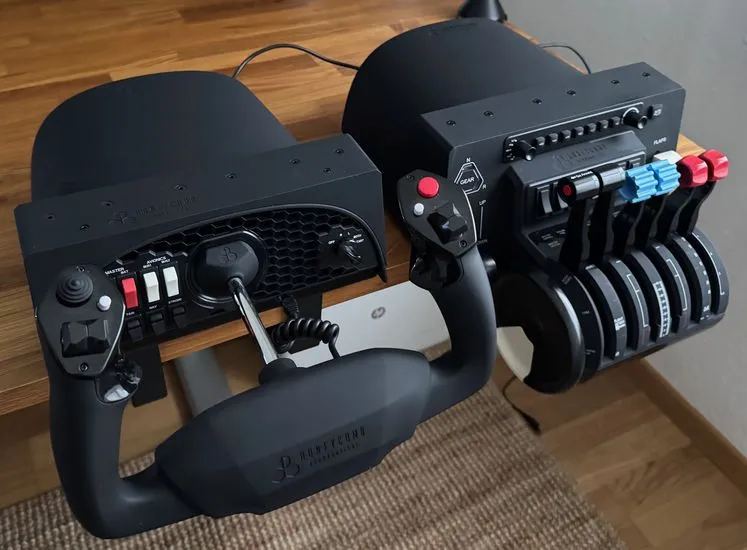
- https://www.thingiverse.com/thing:4554130 for iPad Air or any 11 inches tablet
- https://makerworld.com/en/models/33439 for any iPad/tablet
Assembling
You want more 3D print?
- Next Level Racing 3d print at MakerWorld (Bambu lab - Free)
- Next Level Racing 3d print at Thingiverse (All - Free)
- Next Level Racing 3d print at Printables (Prusa - Free)
- Next Level Racing 3d print at Cults3D (All - Free & $$$)
- Next Level Racing 3d print at Yeggi (All - Free & $$$)
Computer Software
You need:
- Somehow a powerful computer, recommended is AMD AM5 7800X3D, Radeon 7900 XTX or Nvidia Geforce RTX 4080
- Windows 11
- Microsoft Flight Simulator 2024 and or Xplane 12
Resources
- https://www.youtube.com/@thecorporatepilotdad
- https://www.youtube.com/@FilbertFlies
- https://www.youtube.com/@KipOnTheGround
Study materials: Near real-time analysis of general aviation accidents
- https://www.aopa.org/training-and-safety/air-safety-institute/accident-analysis/richard-g-mcspadden-report
- https://asn.flightsafety.org/
Motor failure after takeoff
Great accessories maker
- https://flyhoneycomb.com
- https://www.logitechg.com/en-ch/products/flight/
- https://virpil-controls.eu/
- https://winwingsim.com/view/
- https://realsimgear.com
- https://www.737diysim.com
- https://flightsimdiy.com
- https://flightsimbuilder.com